


HotPads Rent Apartments
4.613.38K Reviews
App Specs
- Version
- 7.1.3
- Updated On
- License
- Free
- Downloads
- 1,000,000+
- Developer
- HotPads (Owned by ZillowGroup)
- Categories
- House & Home
- Platform
- Android, iOS
Screenshots
 Analysis by AppCompare
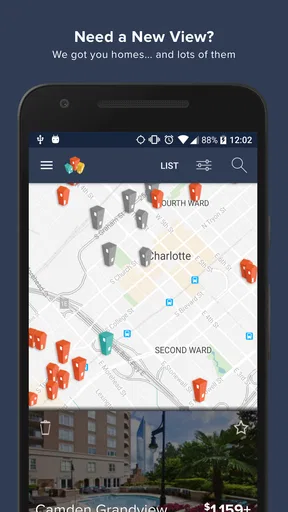
When I look for a rental, I want to understand not only what is available but where each home sits in relation to the places I need to reach. That is the main appeal of HotPads Rent Apartments: its map-led approach makes location part of the search rather than a detail I check only after opening a listing. For me, that changes the task from scrolling through addresses to weighing actual areas against my budget and routine.
Why the map changes the search
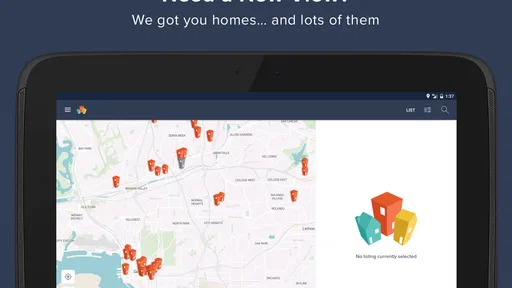
A conventional rental search often begins with a list and a series of filters. That can be useful, but it is easy to focus on attractive photos before noticing that a home is poorly placed for work, school, or errands. HotPads, developed by HotPads, puts the geography in view early. I can scan a part of town, notice how listings cluster, and compare nearby options without treating every property as an isolated choice.
The map is most useful when I have a flexible search area. If I am deciding between two neighborhoods, I can explore both and get a clearer sense of how the available homes are distributed. That does not tell me everything about a street or building, but it gives me a practical first filter: whether the location is worth investigating further.
How I would use it in practice
I would start with a realistic budget and the parts of town I can genuinely consider, then use the map to look for listings near the places that shape my week. A home that seems affordable at first glance may involve a longer or less convenient commute; seeing its position alongside alternatives helps me make that trade-off before I get attached to a listing.
One useful habit is to compare a few homes in the same area before widening the search. That keeps the decision grounded: I can see whether a higher price appears to buy a more suitable location, or whether moving a little farther away opens up better-fitting choices. The map is not a substitute for checking a route at the time I would travel, but it helps me decide which routes and areas deserve that closer look.
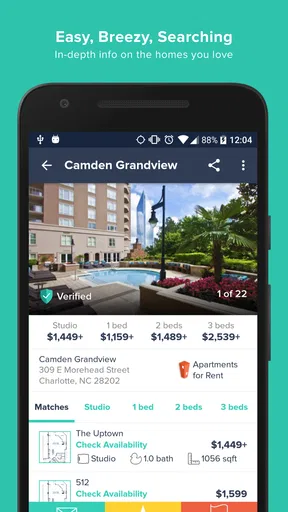
Once a listing catches my attention, I can open its details and use the available photos and description to judge whether it merits a viewing or a message. I would treat those materials as an initial screen, not proof that the home will match expectations in person. Rental details can change, and a map cannot tell me how noisy a building feels or whether a room gets the light I want.
A realistic rental-search day
Imagine that I have a busy workweek and only a short window to search after dinner. I can check areas around my usual destinations, save a small set of plausible listings, and return to them rather than starting from scratch every time. The benefit is not that the app makes a complicated decision effortless; it is that the map can help me eliminate poor location matches before I spend time arranging visits.
Worth Reading Before You Choose

Flipboard Shows What News Apps Must Do Beyond the Feed

Switching to Android Auto Means Rethinking Your Driving Routine

Google Calendar Makes a Crowded Week Easier to Manage

Ludo King Makes the Most of the Minutes Between Plans

Baby Panda World Brings Quick Play to Modern Phones, but Its Game Library Feels Busy

ESPN’s Live Game View Makes Following Close Games Easier
I would also use that shortlist to prepare questions for an agent or property contact. If two listings look similar, I can ask about the details that the map and listing page cannot settle, such as the exact move-in terms or what is included. That makes the app more useful as a planning tool than as a final judge of a rental.
Getting Started with HotPads
First off, let's talk about getting started. Downloading the app is a breeze, available on both Android and iOS. Once installed, you're greeted with a sleek interface that's both inviting and intuitive. The design is crisp, with a focus on usability, which I appreciate since house hunting can already be overwhelming.
Exploring the Features
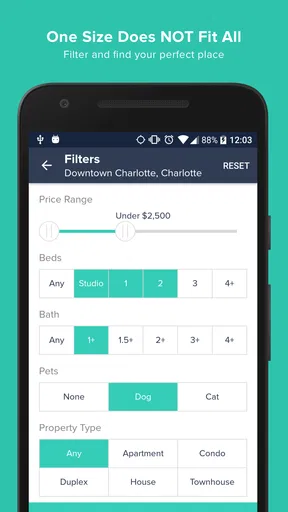
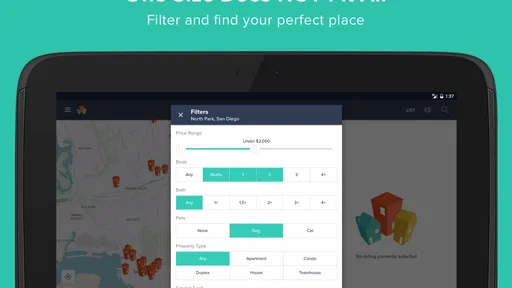
Now, onto the features. What makes this app stand out is its robust search functionality. You can filter properties by location, price range, number of bedrooms, and even pet policies. If you're anything like me, having a pet-friendly option is crucial, and thankfully, HotPads makes that search easy.
The map feature is another highlight. It allows you to visually explore neighborhoods, giving you a feel for the area without leaving your couch. I found this particularly useful for checking out commute options and nearby amenities like grocery stores and parks.
Choosing a useful search area
I find it helps to start with boundaries that reflect daily life rather than drawing a broad circle around an entire city. For example, someone relying on a particular transit line might focus on homes near the stops they actually use, while a driver may want to compare several routes before deciding how far out to search. The app’s map makes it easier to keep those priorities visible while browsing, though I would still check travel times independently.
There is a trade-off between searching narrowly and seeing more possibilities. A very tight area can hide options just beyond a neighborhood edge; a broad search can leave me with too many listings to assess carefully. I would expand the map gradually when the first results do not fit, rather than loosening every preference at once. That helps reveal whether the problem is the location, the budget, or another requirement.
Reading listings with a careful eye
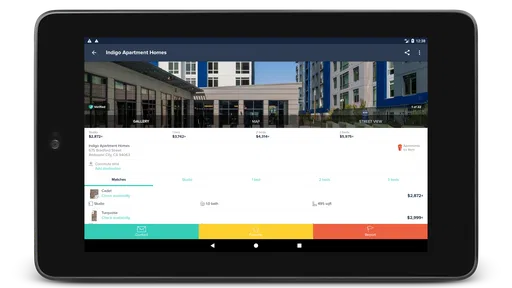
When you find a listing that piques your interest, the app provides comprehensive property details. Think of it as your digital realtor. You get high-quality photos, detailed descriptions, and even virtual tours. This level of detail is something I found incredibly helpful, especially when narrowing down choices from the comfort of my home.
Even a polished listing is only one side of the decision. I would compare the written description with the photos, note any questions that matter to my household, and confirm important terms directly before making plans or commitments. A virtual tour can help me understand a layout, but it cannot fully replace seeing how the space feels or checking the surroundings at a time I would normally be there.
Keeping availability in perspective
Another cool feature is the real-time availability updates. No more falling in love with a place only to find out it's already off the market. This feature alone can save you tons of time and heartache during your search.
I would still treat availability as something to reconfirm before making a trip or reorganizing my schedule. Rental listings can move quickly, and a status shown in an app is not the same as a confirmed appointment. A quick check with the contact before traveling is a sensible step, especially if the home is far away or I have limited time for viewings.
Comparing it with other ways to search
Compared with a property site that presents results mainly as a long list, HotPads’ strongest distinction is how naturally it supports place-first decisions. List-based browsing can be faster when I already know the exact neighborhood or want to scan descriptions in a fixed order. The map is more helpful when I am still deciding where to live, because I can compare location and listing options together.
I would not make it my only source if I were conducting a high-stakes or time-sensitive search. Checking another rental platform and contacting the person responsible for a promising home can help me cross-check what I have found. That is not a knock on map search; it is a reminder that a discovery tool and a confirmed rental agreement serve different purposes.
User Experience and Navigation
Let's chat about user experience. I found navigating through the app to be smooth and intuitive. The developers clearly put a lot of thought into how users interact with the app, which makes it easy to find what you're looking for without unnecessary clicks.
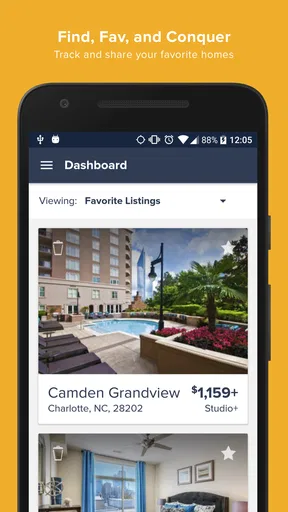
The app also allows you to save your favorite listings, making it easy to compare properties and revisit them later. I loved this feature as it helped me keep track of potential options without having to remember each detail.
A shortlist that supports decisions
Saving a listing is most valuable when I use it to compare real priorities, not simply collect attractive homes. I would keep a shortlist small enough to review, then note why each place made the cut: location, price fit, room needs, or pet suitability. That quick comparison can expose a mismatch I might overlook when opening listings one at a time.
For a couple or household searching together, a shared shortlist can also make conversations more concrete, even if each person has different priorities. One may care most about the commute, while another focuses on space or a pet policy. The app can organize candidates, but the final choice still depends on agreeing which trade-offs are acceptable.
Additional Perks
HotPads doesn’t stop at just finding you a place. It also offers a community vibe with user reviews and ratings for properties. These insights can be incredibly valuable, offering a peek into the experiences of past tenants.
I would read tenant feedback as context rather than a verdict. A review may reflect one person’s particular situation, and it cannot establish that the same experience will apply to every renter. If several comments raise a concern relevant to me, I would turn that into a direct question during a viewing or conversation instead of relying on a rating alone.
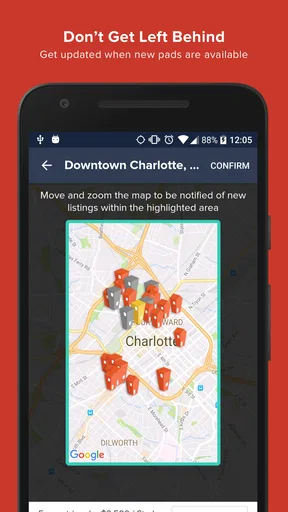
Moreover, the app sends you notifications about new listings that match your criteria. This ensures you are always in the loop, which is perfect for staying ahead in a competitive rental market.
Who will get the most from it
I think HotPads is a strong fit for renters who are open to more than one neighborhood and need location to guide the decision. It is especially practical when I am comparing commute areas, balancing a pet requirement with a budget, or trying to keep several possible homes organized. Since it is free, it is easy to try as one part of a broader search rather than treating it as a commitment.
It may be less useful for someone who already has a specific building in mind and only needs its leasing office details, or for a renter whose search depends on information not shown in a listing. In those cases, contacting the property directly or using a site with the exact specialized filters they need may be quicker. I would also avoid relying on any one app to make a final decision about a home I have not inspected.
Availability, cost, and device fit
The app is free and rated for Everyone, which makes it straightforward to explore without paying to begin a search. It has a 4.6 average from around 44 thousand ratings, and more than a million installs. Those figures suggest a well-used service, but they are not a guarantee that every listing will suit a particular renter or that every local market will feel equally complete.
On Android, the current version is 6.25.2 and requires Android 10 or later. If a device is older, checking compatibility before planning a search can save some frustration. For everyone else, the practical question is less about the app’s popularity and more about whether the map-based results cover the places they are considering.
Wrapping Up
So, what's the verdict? If you're in the market for a new rental, HotPads Rent Apartments is a solid choice. It combines ease of use with powerful features, making it a must-have tool for anyone searching for a new home. Whether you're looking for a cozy studio or a spacious family home, this app has got you covered.
So go ahead, give it a try, and happy house hunting! You'll likely find, as I did, that it takes a lot of the guesswork out of finding your next place to call home.
Pros
- Intuitive interface for easy browsing.
- Comprehensive search filters available.
- Real-time notifications for new listings.
- Detailed property descriptions and photos.
- Built-in map for location-based searches.
Cons
- Limited availability in rural areas.
- In-app ads can be intrusive.
- Some listings lack updated information.
- Occasional app crashes reported.
- No direct contact with landlords in-app.
FAQs for HotPads Rent Apartments
What is HotPads Rent Apartments and how does it work?
HotPads Rent Apartments is a mobile app designed to help users find rental properties such as apartments, houses, or condos. It offers a user-friendly interface with map-based search capabilities, allowing users to browse listings by location. The app provides detailed information about each property, including photos, pricing, and contact information for landlords or property managers.
Is HotPads Rent Apartments free to use?
Yes, HotPads Rent Apartments is free to download and use. Users can browse listings, save their favorite properties, and contact landlords or property managers without any cost. However, some features, such as premium listings or additional services, may require payment. It's always a good idea to check for any in-app purchases or subscription options.
How accurate and updated are the listings on HotPads?
Listings on HotPads are frequently updated to provide users with the most current availability and pricing information. The app sources its data from landlords, property managers, and other listing services. However, as with any real estate platform, there might be occasional discrepancies, so it's recommended to contact the listing provider directly for the most accurate details.
Can I schedule a tour or contact landlords directly through the app?
Yes, HotPads Rent Apartments allows users to contact landlords or property managers directly through the app. Users can send messages to inquire about properties or schedule tours. The app facilitates communication, making it easier for users to arrange viewings and gather additional property information.
What features does HotPads offer to help find the perfect rental?
HotPads offers several features to assist users in finding their ideal rental. These include map-based search, customizable filters for price, size, and amenities, and the ability to save favorite listings. The app also provides neighborhood insights, helping users understand the surrounding area. Additionally, users can set alerts for new listings that match their criteria.


